
Overview
Our Facebook & Instagram Comment Automation feature gives you a powerful way to turn your social media audience into customers — automatically.
Traditionally, you could configure your Messenger chatbot to:
- Auto-comment on users’ comments
- Send automatic replies in Messenger/Instagram DM when someone comments on your posts
Now, with our new AI-powered comment replies, you can go one step further.
You can now reply to comments directly using an AI Agent, for both:
- Public replies (in the comment thread)
- Private replies (in Messenger or Instagram DM)
All handled inside your comment automation settings.
How to setup
To use this tool, Goto Tools > Facebook/Instagram Comment Automation
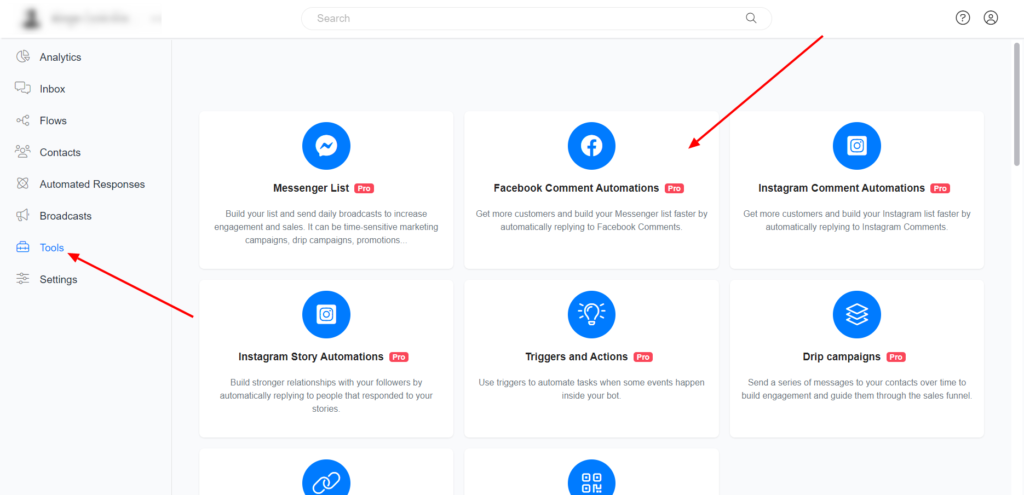
On the Facebook comment automation tool section, click the “Add Post” button above the table and name your Facebook comment automation tool. You will get a page similar to the image below.
Select AI Agent under private reply/Public reply
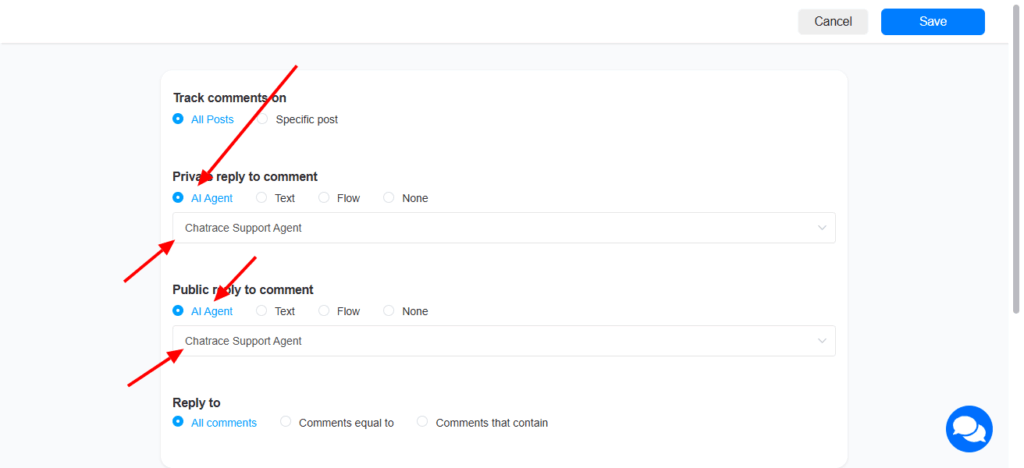
More information about setup page
Tracks Comments on – Choose the post on which you want to use this comment tool.
- All Posts – The comment tool will work on all your Facebook page posts.
- Specific Posts – Comment tool work on the specific post selected
Reply To – This specifies the comment your Facebook comment automation tool will reply to.
- All comments – The Facebook comment automation will reply to ALL the comments in the post
- Comments equal to – The Facebook comment automation tool will ONLY reply to comments that match the keywords you define.
- Comments that contain: The Facebook comment automation will ONLY reply to comments that contain the keywords you define.
Private Reply to comment – This is the message that will be sent to the user on Messenger. You can reply with a flow, product, plain text, events, elections, news, and vendors.
Publicly Reply to Comment – Your bot will automatically reply to the user’s comment with this message. Add multiple variations and your bot will reply with any of the variations.
More Options (Optional) – Even though this additional setup steps optional, it will help you to give additional power to your Messenger chatbot using this Facebook comment tool
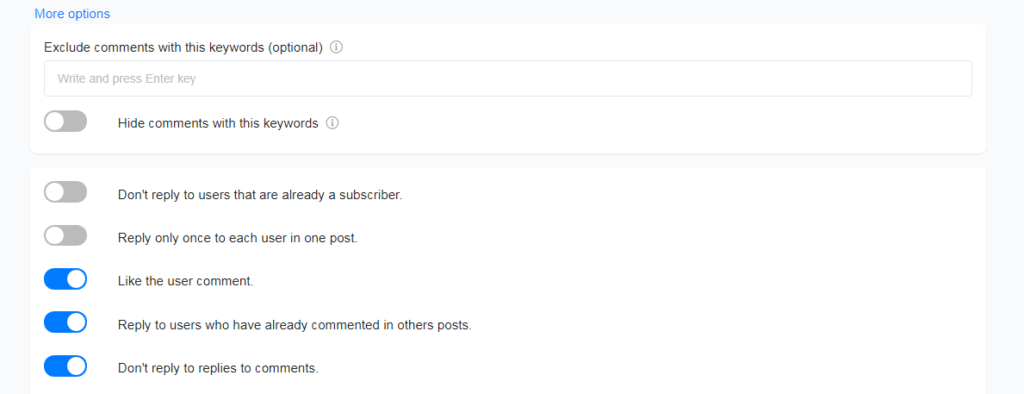
- If you do not want your Facebook comment automation to work on comments with specific keywords, define the keywords, and your Facebook automation will not work on comments containing these keywords.
- You can configure Facebook comment automation to reply to people who are not your chatbot subscriber.
- Like the user’s comment automatically.
- Configure your Facebook comment automation to reply to users who already commented on your previous Facebook posts.
- Set the Facebook comment automation to reply to ‘replies to user’s comment’ in the comment section.
Hope this article helps you understand how to use the “Facebook Comment Automation” tool on the Chatrace platform.